Appearance
Bins
Bins represent a storage place for stock, i.e. a shelf, box or tray. A Bin is assigned to an Area, and an Area will often contain many Bins.
The Bins page is accessible to users with Admin privileges and will only display bins for the selected location.
See example
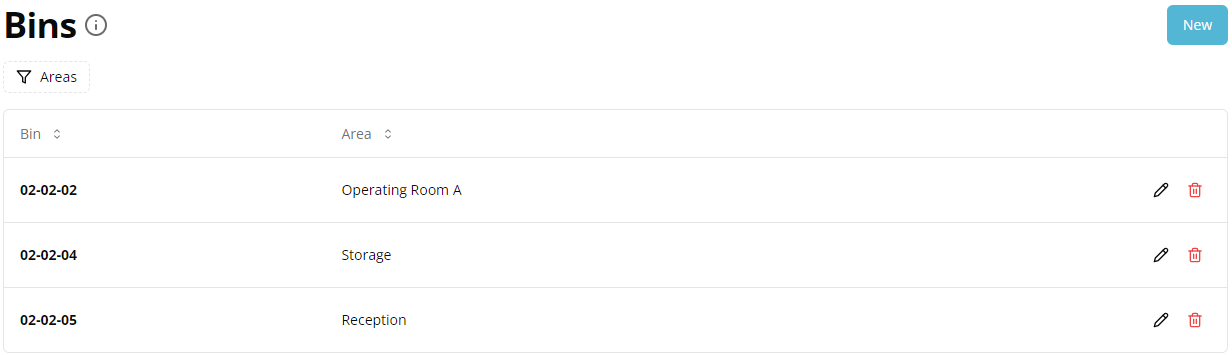
Bin Management
Go to the Bins page from the settings Configuration Menu, located in the top-right corner.
You can view, create, edit edit or deletedelete bins for a selected location. When you change a location, the bins list will refresh automatically.
You can also filter the list using of the filter_alt tools available or use the View toggle to control what you want to see/hide in the list.
Add a Bin
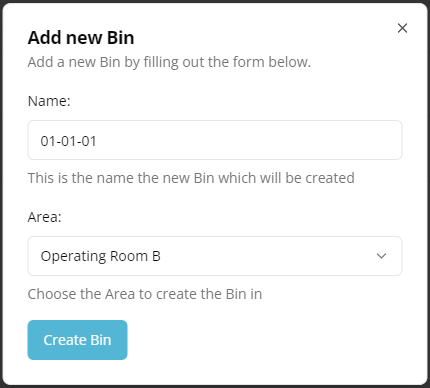
To add a new Bin click New.
Enter the Name and select the Area that the bin is in. The name must be unique.
Click Create.
See example
Note
A Bin can only be deleted when no products are assigned to it. You can edit product(s) stored in the Bin in the Products page.